Create Form Routing and Recovery
Create Form Routing and Recovery
Section titled “Create Form Routing and Recovery”Create, Explore, and Gallery use the shared FacetedCreateForm or show a recoverable error. Missing metadata, unsupported products, and failed resolution never select legacy generation.
Open state and resolution ownership
Section titled “Open state and resolution ownership”The overlay opens through showCreateImageAtom in create-generate/store.ts. promptDataAtom carries presentation, diagnostics, and explicit new-transform context. The ephemeral exampleSeedAtom carries the resolved preset or Gallery recipe: catalog item, safe prefill, workflow overrides, typed initial inputs, and resolution ownership.
Example and Gallery openers open immediately with a loading seed and an attempt ID. A lookup can replace only its own seed while that open remains active. Closing, choosing another item, or timing out invalidates the old result. Resolution is bounded to 20 seconds, and explicit retry starts a new attempt for the same source.
resolveExampleSeed first tries an available family, including compatibility supplied by the example’s authored hidden inputs. It can recover to a compatible singleton backed by the example’s own workflow contract. If neither works, the seed retains an explicit unavailable result. An example without workflow metadata also reaches that error state.
Both ready branches also set ExampleSeed.product from the preset media type:
image_example, video_example, or carousel_example. This selects prompt
placeholders, Tips, and quantity policy from FACETED_CREATE_FORMS; it does not
replace the resolved catalog item, workflow contract, or authored input overrides.
See the shared seed resolver.
flowchart TD
    A["Open or retry with source context"] --> B{"Entry point"}
    B -->|Preset or Gallery Recreate| C["Resolve authored family or workflow binding"]
    B -->|New Edit, Create video or Create carousel| D["Latch explicit action and selected source"]
    C -->|ready| N["FacetedCreateForm and DS layout"]
    D -->|supported| F["Resolve product family and bind inputs"]
    F -->|ready| N
    C -->|unavailable or timeout| X["Visible error and Sentry"]
    D -->|unsupported| X
    F -->|unavailable or incompatible| X
    N --> G["generationCatalog.generate"]
Products, reuse, and source media
Section titled “Products, reuse, and source media”productForPromptData maps explicit new Edit, Create video, and Create carousel actions to their destination families. Gallery Re-create enters through a resolved recipe instead. The shared resolveRecreateBinding decision powers both Gallery action eligibility and the opener, including known products, other current families, and genuine standalone workflows.
Older preset generations can lack a saved workflow. Gallery resolves their current example’s family or pinned workflow at the saved rating. The example’s authored inputs can satisfy an otherwise blocked variant. A matching saved locked prompt is accepted without overriding its authored value; a conflicting locked prompt is refused. Deleted examples remain unavailable.
For generations without a preset, a recorded family is authoritative. Its saved workflow is preferred when still available at the original rating; otherwise the family selects a compatible variant in axis order. Without a family key, the saved workflow must belong to a current family or identify a standalone catalog workflow. No historical name mappings or prompt/type/source guesses remain. Confirmed unsupported generations hide Re-create; lookup errors remain actionable for retry. Recorded but unavailable families retain their identity and show the unavailable state. See Gallery’s recipe resolution rules.
Initial state separates workflow selection from media inputs. A new Edit, Create video, or Create carousel action uses the selected media and its destination family’s defaults. Re-create of an existing result preserves that result’s compatible workflow selection and original input ID, including uploads and My Library selections. Each subsequent result records the submitted source again, so repeated Re-create does not replace an outfit or reference image with the previous generated output. Prompt edits, character, aspect ratio and supported video duration follow the selected result. Gallery media responses put the saved duration first while preserving other authored options and their pricing multiplier; hidden or locked preset settings remain authoritative.
bindInitialMedia binds against the resolved workflow’s declared inputs: use an explicit compatible input key, or require exactly one compatible target. Missing IDs, ambiguous targets, duplicate media, incompatible types, and capacity violations refuse the form. Hiding a bound source control does not omit that media from the submission.
Example IDs reach the server as provenance and as a key for authoritative hidden/locked input injection. Private authored values are not copied into client telemetry. Character ownership, 18+, KYC, subscription, credits, and upload recovery remain generation-time checks; preserving a source rating does not grant access to it.
Gallery Re-create: rating and character changes
Section titled “Gallery Re-create: rating and character changes”Re-create keeps the selected result’s original SFW/18+ rating for photos and carousels. Choosing an 18+ character does not turn an SFW recipe into an NSFW recipe. The character picker remains usable for characters eligible for the saved rating, except when replaying an image-edit or image-to-video recipe: those operations retain the source character. Models can change only within that rating.
ExampleSeed.preserveNsfw and isNsfw carry this rule into
useFacetedSurface. restrictCatalogRating removes variants with the other
rating and recalculates available axis options before the form resolves a
workflow. This prevents a model change from switching rating indirectly.
The disabled toggle explains: “Re-create keeps the original content rating.”
The API and background worker allow a reference from another character only for these server-resolved families:
| Family | Same-user reference that can be reused with another character |
|---|---|
re_create |
An uploaded image stored as InternalInput. |
kack_me (image-to-carousel) |
An uploaded image or a Gallery image. |
try_on |
An uploaded image or a Gallery image. |
Both checks require the source to belong to the requesting user. Target character eligibility, 18+ access, KYC, subscription, upload readiness, and Edit self-likeness checks still apply. Other families keep their existing character binding. A text-only carousel has no image reference to transfer. Try on and KackMe keep the character picker: changing character does not bypass the selected workflow’s content rating, target-character eligibility, or KYC checks. This reference-reuse exception does not add a source-image rating lock.
The original-rating lock is a frontend rule: the submit request does not identify the original generated result for the API to compare. The server still resolves and authorizes the requested workflow’s rating. The reference reuse rules above apply to those families across entry points, not only Gallery Re-create. Separate Edit, Create video, and Create carousel actions continue to start a new operation.
Manual QA: change character without changing rating
Section titled “Manual QA: change character without changing rating”Use an SFW photo and an 18+ photo created through uploaded-photo Recreate, and an SFW carousel and an 18+ carousel created from an image. Include an uploaded reference and a My Library reference among the carousel cases. Run the following sequence once for each result:
- Open Gallery → Re-create. Confirm the form restores the result’s rating.
- Choose another eligible character. For the SFW result, choose an 18+ character: the rating must stay SFW. The 18+ toggle must not change it.
- If another model is offered, select it. The rating must still match the original result; a model available only at the opposite rating is unavailable.
- Generate. Confirm the request uses the new character, the original input media ID, and the unchanged rating. Confirm the job finishes and the result appears in Gallery; acceptance into the queue alone does not verify the worker.
- Re-create that new result. Confirm it still uses the original reference rather than the generated output, with the same rating.
For one 18+ case, also use an account or character missing a required 18+ permission. Expect the normal recovery or eligibility block, with no silent switch to SFW. Do not repeat unrelated prompt, ratio, or quantity checks here.
Gallery source character binding
Section titled “Gallery source character binding”Gallery Edit, Re-create of an edited image, and Create video retain the source character and hide the character selector. Replaying an edit repeats the editing recipe; it does not transfer the image to another character. The submitted character and eligibility checks must use the bound character even if another screen changes the global character selection. The API and worker keep their source-character checks.
The existing rating rules still apply: Re-create preserves the saved rating; a new Edit or Create video operation uses its existing permitted rating options.
For QA, open each of these three actions while another character is selected in Gallery. Confirm there is no character selector and that the submitted character matches the source. For Re-create, verify the request reuses the original input image rather than the edited output. Ordinary uploaded-photo Re-create and image-to-carousel Re-create must still allow an eligible character change.
Submit failure events include extra.submit.serverReason for known static
server errors, plus the tRPC code and HTTP status when available. Unknown errors
use unknown_error; prompts, raw messages, stacks and request inputs are not
included. The existing attemptId identifies the frontend attempt, not a server
correlation ID.
One production form
Section titled “One production form”Product pages, example pages, and overlays assemble the same FacetedCreateForm with DS-owned responsive geometry. Product definitions own titles, tips, and media-input policies. Create navigation and the chooser also use this flow unconditionally. There are no create-flow or faceted-product PostHog switches or retained previous form bodies.
Supported products always use the faceted form. Workflow eligibility, input validation, and entitlement checks still apply; unsupported products or contracts produce an unavailable state. Rollback requires a reviewed code revert; it is not a runtime switch to a legacy form.
The overlay host owns ResponsiveDialog, dismissal, focus, and open state. FacetedFormLayout owns only the page/overlay layout and optional content regions. Closing clears the example seed and the shared open atom.
Collab entry and character selection
Section titled “Collab entry and character selection”The character-mentions flag exposes Collab in Create and Explore. Below the
Custom prompt banner, the creation tiles appear in this order: Collab,
Recreate a photo, Content dump, Try on, Edit a photo. Collab is omitted when
the flag is off. Its New badge is presentation only.
Collab uses the shared prompt editor and the same form width as Custom prompt. It omits Get inspired and prompt-assistance buttons. The character strip keeps its order while selection changes. Selecting a chip adds its UUID mention to the prompt; deselecting it removes that mention. Removing a mention in the editor also clears the chip selection. An empty cast is allowed while editing, but Generate remains disabled until at least two distinct eligible characters are mentioned. Description text is optional; two eligible character tags alone can be submitted, matching Custom prompt behavior. Selecting a character in the strip inserts its tag at the last saved caret position, or at the end if no position is saved, without reordering existing tags or description. Typing continues after the inserted tag and its trailing space. Mouse selection focuses the editor. On touch devices, selection preserves an active editing session but does not open the keyboard for an inactive editor.
Gallery Recreate also shows the strip when the workflow supports multiple character mentions and the prompt is editable with no bound character. This does not apply the dedicated Collab requirement for two characters to Recreate. The strip, character picker, and mention suggestions request 128px CDN avatars from the existing permission-aware image source.
Faceted forms keep their 18+ content control visible. Enabling it with any SFW-only participant shows a toast naming the blocked characters and leaves 18+ off. The check includes prompt mentions, the primary character, and source image participants for I2V. Unknown source participants also block activation. Model availability, fixed preset ratings, and consent gates remain enforced.
Collab shows Photo and Video tabs. Outputs are disabled with an explanation while the catalog is loading or unavailable, or when no available variant supports at least two character mentions. Switching tabs retains the draft prompt, including character mentions. Carousel stays hidden until its workflows support the mention editor. Custom prompt keeps Photo, Video, and Carousel. Gallery and the generation queue display character tags as readable names, with an unknown-character fallback. Stored prompts and copied prompts retain their original tokens. Gallery Information lists all distinct participants from the primary character, lineage metadata, and prompt mentions. Each participant links to their own character gallery.
Custom prompt shows explicit mentions in Settings, including overlapping avatars for multiple characters. Its character menu supports multiple selection and Done. Both editors use the same neutral inline mention appearance and avatar/tag suggestions. Workflow capacity and character eligibility still control which combinations can generate.
For QA, select and remove characters from both the strip and prompt. Confirm that the roster does not reorder, repeated toggles do not accumulate spaces, and deleting the final mention clears selection and disables Generate. Check Create with the flag on and off, plus the two Explore banners at mobile and desktop widths. Both banners use the same progressive blur on mobile.
Shared Create presentation
Section titled “Shared Create presentation”The shared layout keeps the following contracts across product pages and open Create sheets:
- Preset photos, videos, and carousel frames fit without cropping their source proportions. Mobile rounds the actual media boundary and omits the desktop backdrop. In an open mobile sheet, the preview shrinks proportionally against a viewport-relative height budget to leave room for the collapsed prompt, settings, and Generate. Very short viewports retain scrolling rather than compressing the image out of proportion.
- Desktop Tips, including its icon, sits beside the heading. Upload wells use a
light hover fill, and the initial media placeholder uses the same light
skeleton treatment as the form. Removing an attached photo uses the recycle
bin icon. Ordinary mobile forms can show Tips in their header; example
presentation omits mobile Tips. The visible Prompt label is hidden, while
aria-labelnames the editor for assistive technology. - Back and Close navigation icons are 24 × 24 px on mobile and desktop. Their tap targets remain 40 × 40 px on mobile and 44 × 44 px on desktop.
- Preset prompts initially collapse to five visual lines on mobile. Show more
and Show less retain the same draft; overflow is remeasured when the editor
width changes, including rotation. Closing the Create chooser cancels a
selection waiting for character data, so a late response cannot navigate away
after dismissal.
CreateDialog.handleCloseclearspendingNavigationbefore removing thecreatequery parameter; its effect also clears that callback whenever the chooser is no longer open. This is separate from clearing the resolved preset seed when a generation overlay closes.
Content Dump shares the Create sheet, heading, settings, and Generate layout. A horizontally scrollable card row exposes packs directly in the form. Selection applies immediately through the existing debounced quote; no picker dialog or Confirm step is needed. It retains random selection, multi-pack selection, character-specific pack restrictions, photo/video/carousel quantities, batch limit, quoted prices, character selection, and 18+ eligibility. Content Dump does not display a Recent creations section below the form. Its presentation does not introduce a free-text theme, prompt enhancement, or a model selector that the existing pack workflow does not support.
For layout QA, check a tall portrait and a landscape preset on desktop and a mobile viewport, then resize with a wrapping prompt open. Check an empty upload, its hover and loading states, an attached-photo removal, and Content Dump pack selection and quantity controls. Delay character loading, select a Create mode, and dismiss the chooser before loading finishes: no delayed navigation should occur. These checks describe acceptance scenarios, not a deployment verification claim.
Failures and submission boundaries
Section titled “Failures and submission boundaries”FacetedUnavailable renders an alert with a generic explanation and an appropriate close/back action. Retry is offered only for retryable resolution failures. An uncertain submission tells the user to check Gallery before trying again; recovery never automatically resubmits a generation.
createFacetedAttempt permits one structured Sentry invocation per active frontend attempt. It sends stable reason/stage/surface fields and allowlisted identifiers, excluding prompts, source URLs, and original exception text. Render boundaries and submission handlers feed the same recovery UI. Expected entitlement and required-field gates remain normal user actions.
The authenticated, validated media.createImage endpoint rejects every historical request shape before any downstream generation call, including markerless examples. It records the retired endpoint failure and returns a generic refresh message.
Legacy create-page/chat components, direct-generation pages, client mutation hooks, workflow-marker dispatch helpers, and previous presentation bodies are removed. Shared controls remain only where the faceted form or another live consumer needs them.
Batch and content-dump boundaries also refuse legacy examples. Quote and submit read current published workflows, require compatible contracts, and validate authored inputs after the worker’s media normalization and context injection. A blank required text input fails a batch item because no batch surface can fill it, unless the example hides or locks that input; individual generation dispatches a locked blank as authored, and so does the batch. Content-dump quotes exclude unusable picks and use the generation pricing path. Preset ratings describe Explore content; the current workflow rating controls generation authorization, as it does for individual generation. SSFW presets can use SFW workflows in both multi-select and Content Dump. Content Dump preview checks that the workflow belongs to the requested, entitled rating pool, and submit refuses a safe/adult pool change after preview. Batch submit rechecks eligibility, returns ordered per-item results, and preserves valid items when others fail. Current workflow rating reaches the existing authorization and charging path without being replaced by a cached rating; unexpected refusals are reported to Sentry. The batch ID remains a grouping key, not a server idempotency guarantee.
Current layout captures
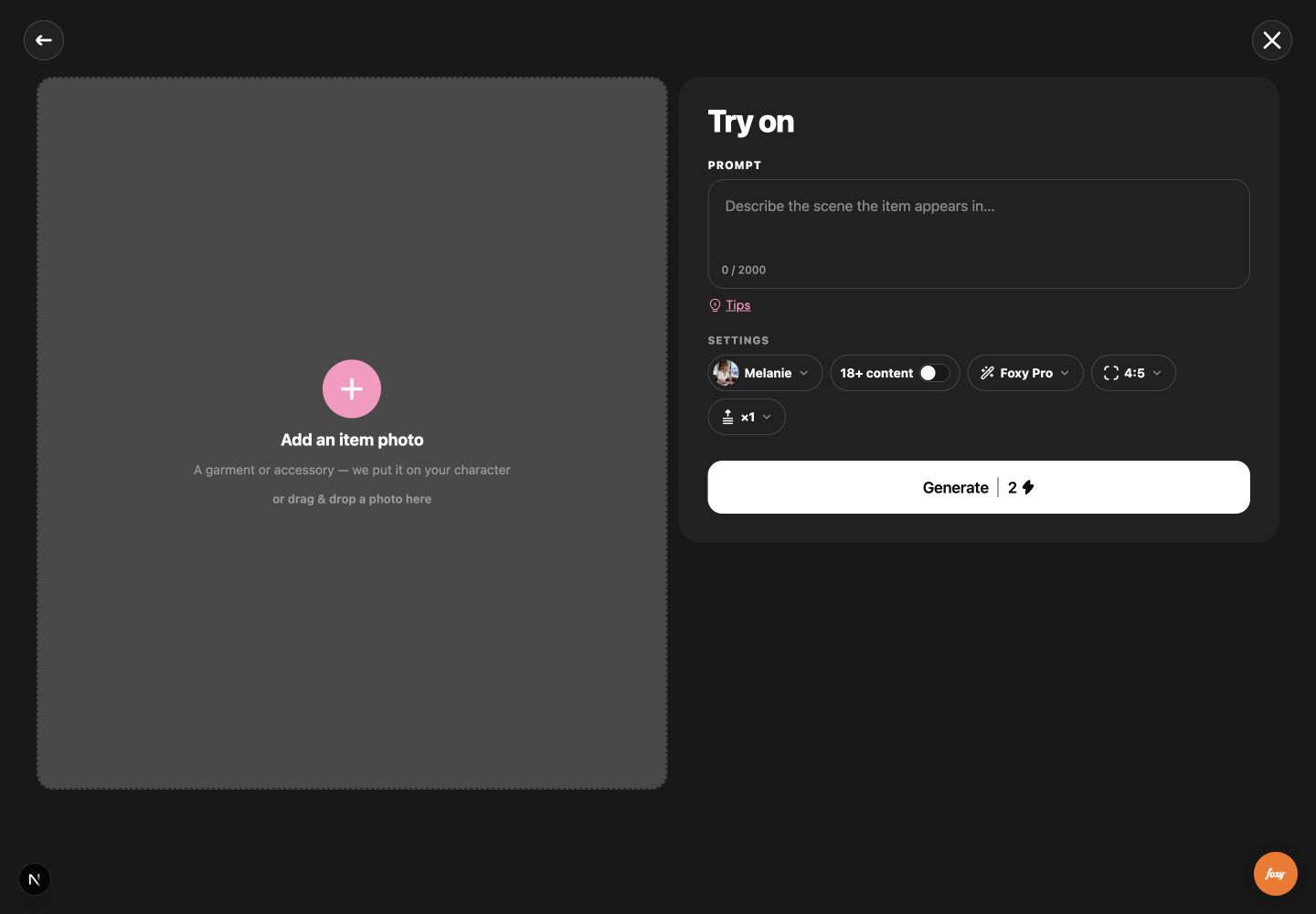
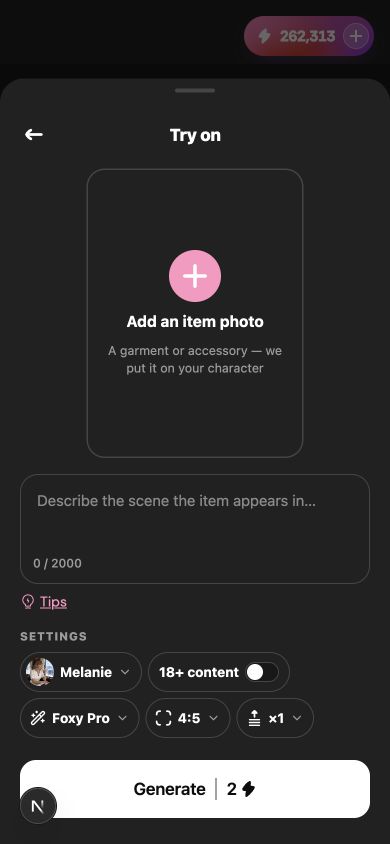
Section titled “Current layout captures”These September 15 local-app captures show Try on using the shared form and settings controls. No generation was submitted. They illustrate desktop/mobile layout, not deployment QA or backend persistence.
See also
Section titled “See also”- Generation Families — Frontend — contracts, control binding, ordered axes, and the shared form.
- Generation Families — families, tuples, and server resolution.